Diet Claude buying guide: one reset does not restore every allowance
Use two paper gauges to see whether an extra usage display identifies the window and the scope of its reset. Skip the extension if the built-in page already does that.
Diet Claude presents Claude usage in a browser extension. The maker's launch notes describe usage, time left, and resets; the launch-day brief distinguishes shorter and weekly usage. The useful question is not whether the gauge stands out, but whether it says which window its time remaining belongs to. The display does not grant any allowance.
Draw two fictional gauges. The short window is nearly full and will reset after the current task; the longer window is also near its limit but is not due to reset. Clear the first gauge without moving the second. Ask someone, using the labels and marks alone, which window reset and whether the other was verified. One shared “restored” light would invite them to apply the first result to both. This does not measure anyone's usage or specify real window lengths.
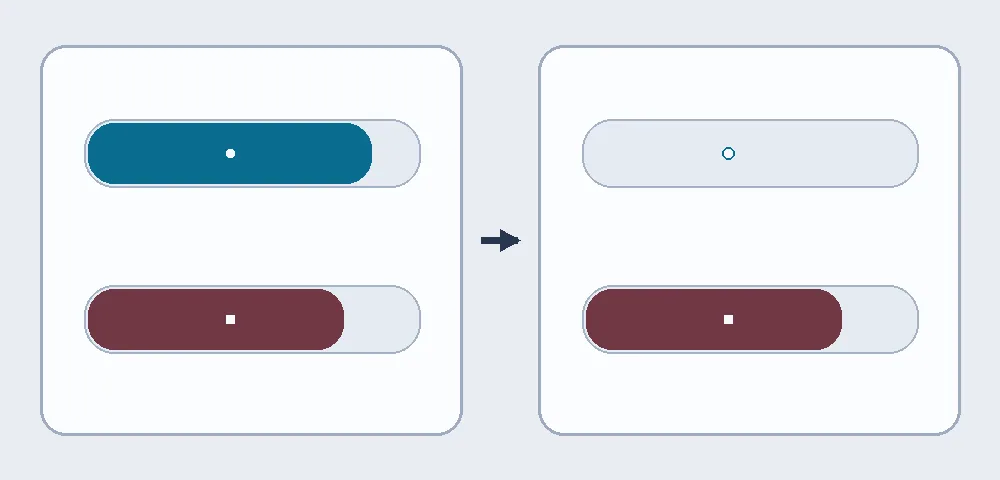
On paper, the short upper window clears and the long lower window stays put. Each has its own reset point.
An extra display may save a lookup if you often need both states before starting work. Keep the built-in view if you check rarely or it already shows both clearly. An extension adds software and browser permissions to review. If you only need a gauge, do not make retaining or handing off conversations a requirement. This exercise installs nothing, transfers no conversation, and does not cover raising or evading limits.
Content note:This article is based on publicly available information and is intended as a reference for evaluating tools. Features, pricing, and related policies may change at any time; please refer to the latest official information.
Original source:dietclaude.com