Choosing docktor: Can a thumbnail distinguish windows with identical titles?
Use three static window mockups to separate titles, visible content, and whether changes have been saved.
The developer of docktor introduced window thumbnails in the macOS Dock in an April 2026 launch discussion. Rather than relying on the app icon, it aims to help when an app has several open windows and you need to recognize one. The product documentation also distinguishes images showing actual content from placeholders showing only the title and app mark. A placeholder does not mean the content was read, and a thumbnail does not prove the file was saved.
Find a target among three mock windows with the same title
Draw three unbranded, fictional paper cards. A and B both say “Color Notes”; A shows a three-column table, while B shows a circular chart. C also says “Color Notes” but has only a title and an empty frame. The task is to find the window corresponding to the circular chart. First show just three titles: the reader should say they cannot yet distinguish them. Then show the cards. B has the target image and is a candidate to inspect next. C has no preview: that does not rule out a circle in C or establish that B is the only circular chart.
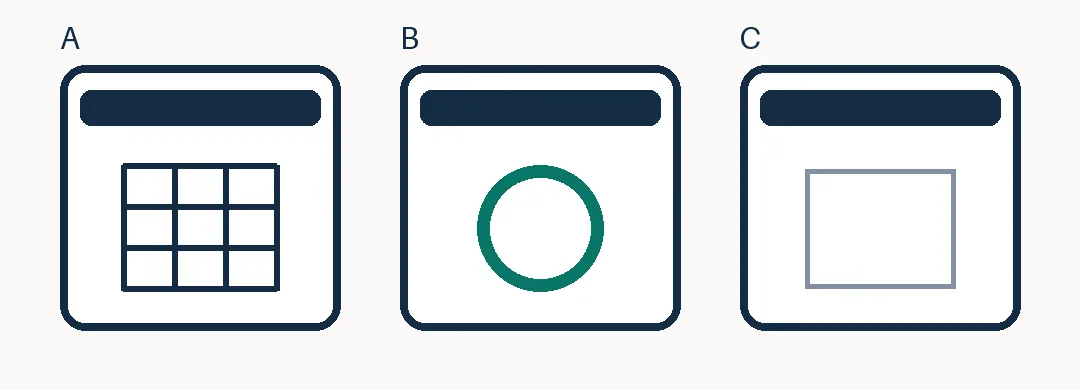
The matching dark bars represent identical titles. B shows a recognizable circular chart; C has no preview, so its content remains unknown. This is not a software screenshot.
Ask a new reader to explain why they chose B and why C remains unknown. Then ask if B has been saved. None of the cards shows save status, so seeing the chart does not support a “saved” answer. No Mac, software installation, real windows or screenshots, or permission changes are involved.
When you have few windows, distinguish their titles first
If identical titles frequently cause confusion and the images actually distinguish the windows, compare lookup time using previews with lookup time after manually renaming windows. If you only switch between two windows that can be clearly named, different titles based on their purpose are usually enough. If you actually need the thumbnail content, check display scope, version, and organizational authorization separately. This mockup makes no guarantee about permissions, performance, or completeness.
Content note:This article is based on publicly available information and is intended as a reference for evaluating tools. Features, pricing, and related policies may change at any time; please refer to the latest official information.
Original source:news.ycombinator.com