Draw3D buying guide: a guide line in a sketch should not become a seam
Use a temporary line across a block to see whether a photoreal image mistakes notation for structure.
The April 10, 2023 launch coverage introduced Draw3D as converting sketches into photoreal images. Its feature page also describes taking a drawn outline to an image. Distinguish exploring surfaces and light from changing structure: convincing texture does not prove that each line preserved your intent.
What happens if a drawn line was not an edge?
Draw a block with no seam. To align a nearby dot, add a pale dashed guide across the block and mark it as a reference. Compare two original paper examples. The first changes light and shade but leaves a single piece. The second looks equally dimensional but turns the guide into a seam across the face. A reviewer should say that the second altered the relationship of parts, not just color. Hide the explanation and ask someone to circle which needs checking against the sketch and exactly where. Picking the most photographic one misses the one feature that must not change.
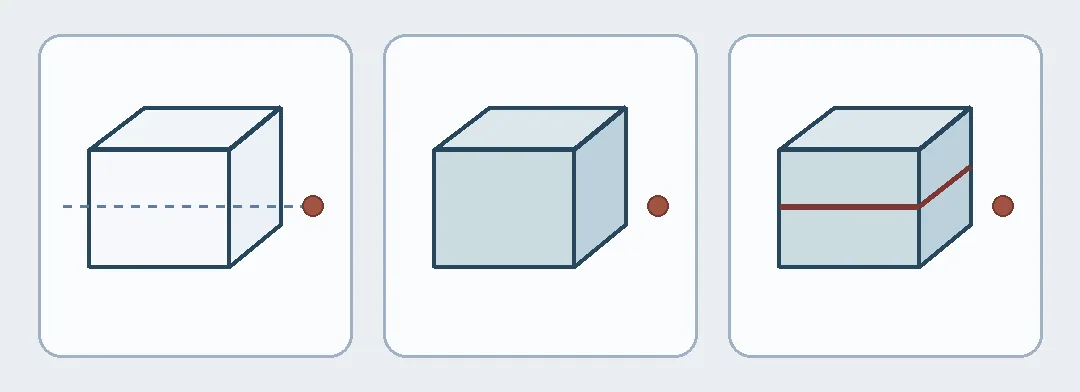
Original drawings: alignment guide at left, intact block in the center, false seam at right. None is Draw3D output.
Sketch rendering is worth considering for material and lighting variations if structure can be verified against the original. For editable dimensions, part relationships, or exact outlines, prefer the original, hand coloring or a model you can edit. Do not use a photoreal image as a geometry handoff. No service was used and no sketch was uploaded or generated; all comparisons are original geometry.
Content note:This article is based on publicly available information and is intended as a reference for evaluating tools. Features, pricing, and related policies may change at any time; please refer to the latest official information.
Original source:draw3d.online