Emberly buying guide: Does a note belong on the shared topic or a branch?
Use a hand-drawn topic tree to separate shared notes from branch-specific instructions, without real files or accounts.
Where a note sits in a tree can change where the next reader thinks it applies. An Emberly author post from August 3, 2022 describes a mind-map-style knowledge tree, and the product page says nodes hold notes, files, and links. That describes the structure, not any automatic inference about which rules apply. This example is drawn by hand.
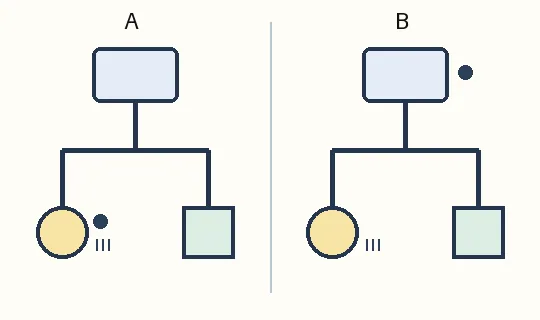
Draw a topic called “Exhibit labels” with branches called “Circle” and “Square.” One rule applies to both: “Write the date.” Another applies only to Circle: “Also write the ID.” In A, both go under Circle, so someone reading only the shared node misses the common rule. In B, the date is on the shared topic and the ID stays on Circle, with the scope of each stated. B lets you tell whether Square needs an ID without guessing from the layout. No real files, addresses, people, uploads, or collaboration are involved.
For a short list, two columns, one for rules and one for what they apply to, may suffice. If you often move between shared subjects and individual branches, compare how Emberly holds material in nodes. The hierarchy can help you find a note, but separately check where the rule is written and what it covers.
Content note:This article is based on publicly available information and is intended as a reference for evaluating tools. Features, pricing, and related policies may change at any time; please refer to the latest official information.
Original source:blog.ember.ly