Equally AI buying guide: The focus ring is visible with the widget. Is it still visible without it?
Use two acceptance conditions for a fictional exhibition page to distinguish a runtime fix that depends on a widget from a fix in the site’s own code.
If you want to add access assistance to existing pages quickly, Equally AI is a candidate for runtime remediation. If your ticket says “the page itself must support keyboard use,” don't call one pass with the widget active a source-code fix. The Equally AI Help Center distinguishes the two: the widget applies fixes automatically while someone uses the site, without rewriting its code; an expert audit examines code and page structure and gives developers recommendations they can implement. Receiving the report does not mean those fixes have been deployed.
One “View exhibits” button, two acceptance records
Imagine a paper-craft exhibition page with three controls in order: “Exit directions,” “View exhibits,” and “Back to index.” Check the middle one only: can a keyboard user see that focus has reached “View exhibits”? The technical background is W3C's visible keyboard focus criterion.
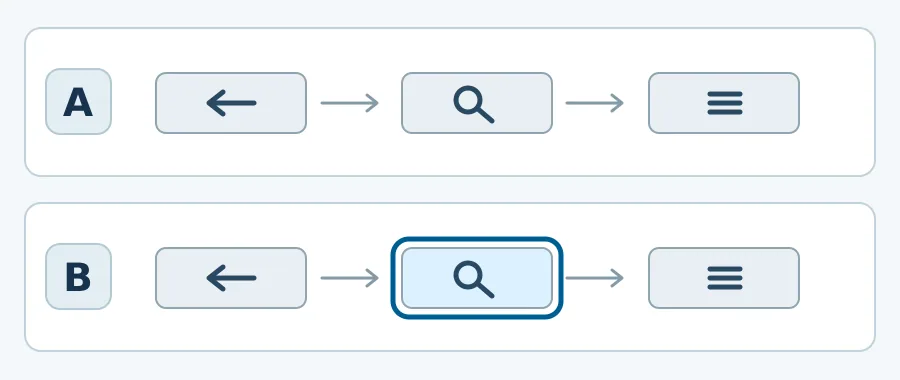
Fictional acceptance cards: the second button's focus is visible in B only. The two rows are different test conditions.
This is a made-up diagram, not a product screenshot or test result. A is the site on its own; B is the same page with the assistive layer. If B passes and A fails, record “visible under condition B.” That observation alone does not establish causation or close a source-fix ticket. If both pass, this button shows no incremental benefit from the widget; spend the review time on pages where difficulties remain. A pass on one button is not a site-wide pass.
The choice depends on who can maintain the page
If the template cannot be changed soon and the team can keep checking pages that rely on an assistive layer, the widget is a candidate for that limited purpose. If updated pages must pass keyboard checks without the layer, prioritize fixes by the people who maintain the template, based on the audit, and verify the changes independently. If the issue is limited to one template you already maintain, first fix and recheck the original page with a keyboard; you do not need another product layer first.
Content note:This article is based on publicly available information and is intended as a reference for evaluating tools. Features, pricing, and related policies may change at any time; please refer to the latest official information.
Original source:support.equally.ai