EZAudio buying guide: Keep the three highlighted beats or remove them?
EZAudio’s local cutter can keep or delete the same highlighted range. Use a twelve-beat paper strip to check output length and the join before deciding if single-track trimming is enough.
Making an audio selection does not yet decide what happens to it. The official cutter guide from EZAudio distinguishes two outcomes: Cut keeps the highlighted section; Remove deletes it and joins what remains on either side. If all you need is an excerpt from your own material or to remove one silent spot, checking these two outcomes is enough to see whether this single-track editor fits. You do not have to start with mixing software.
Check the output on a twelve-beat strip without a real recording
Draw twelve equal cells numbered 1 to 12 and color beats 5, 6, and 7. Assume all beats have the same duration. If the deliverable consists only of those three beats, it starts at 5, ends at 7, and lasts three beats. If the three beats are removed instead, the result contains 1 through 4 and 8 through 12, lasts nine beats, and joins 4 directly to 8. “It’s been edited” tells you nothing about which version was delivered. Check both its length and the new join. This paper exercise needs no audio file or hands-on test of the tool.
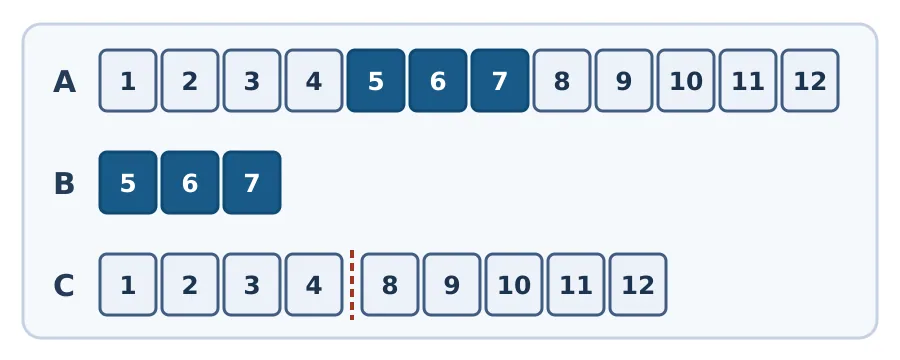
Figure: A is the original twelve-beat strip; B keeps only the highlight; C removes it. The dashed line in C marks the new join between beats 4 and 8.
When checking an actual export of audio you made yourself, do not rely on the browser preview alone. The guide recommends reopening the exported file to check its length and both ends. In the removal case, also check that the new join does not interrupt a sound meant to continue. If you need fine edits at the join or want to layer a paper rustle over another background sound, choose a multitrack editor. EZAudio says the cutter processes on the device without uploading the file; other tools on the site, such as conversion tools, may process files on a server. Do not assume the cutter’s handling applies to the whole site. Browser decoding support and device memory also determine whether a long file can be opened.
Content note:This article is based on publicly available information and is intended as a reference for evaluating tools. Features, pricing, and related policies may change at any time; please refer to the latest official information.
Original source:ezaudio.io