FireCut buying guide: The chapter name is unchanged. Does the new cut still jump to the right place?
A fictional before-and-after timeline separates an unchanged chapter title from its shifting destination.
An early introduction from FireCut lists chapter detection; its chapter documentation distinguishes reference markers during editing from timestamps prepared near the final cut. A chapter title can stay the same while its destination depends on the timeline actually delivered.
Removing two seconds does not shift every chapter
Make a fictional paper-model timeline: base at 00:03, top panel at 00:08 and whole model at 00:13. Version 2 removes the transition from 00:04 to 00:06 without changing the scenes. Base stays at 00:03; top becomes 00:06 and whole view 00:11. A list still saying 03, 08 and 13 has correct names, but the last two positions are wrong for this cut.
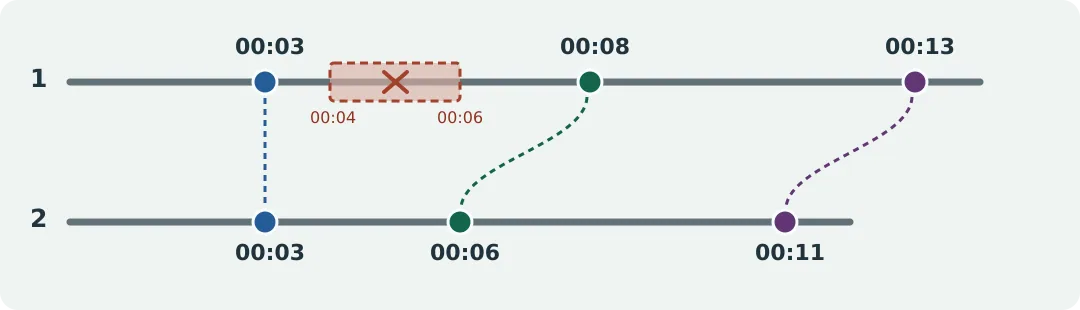
The removed segment comes after the first chapter, so subtracting two seconds from every timestamp would be wrong.
Now make a new whole-view card with the same name but no version. Its position is unconfirmed rather than inherited. For handoff, check name, time and paper scene together and label the final cut.
Save time finding chapters or checking the final entry points?
If many topics need a navigable list and the team can check near picture lock, compare chapter detection. For a few sections or frequent timeline edits, keep manual topic labels and check times at the end. Budget time to recheck the version and update the handoff. This example moves paper only, with no editor, sound, video, real people or platform use.
Content note:This article is based on publicly available information and is intended as a reference for evaluating tools. Features, pricing, and related policies may change at any time; please refer to the latest official information.
Original source:firecut.ai