Choosing Flim: Why reject a reference with the right color?
Use color and framing as separate gates. Fictional cards distinguish a palette reference from a composition that passes.
Flim’s September 2026 filtering guide describes filters you can combine: specific HEX values or palettes, shot size, and still versus moving clip. That is useful when a team needs both a palette and a framing decision for its own image. Search results are references, not licenses to redistribute.
Judge color and composition separately
Use three original abstract cards instead of film stills. A is dark blue (sample target: #274565), with two small squares in one corner and a broad blank area at right. B uses the same blue but its squares run into the edges. C has A’s layout but a warm orange background. Only A meets a fictional brief for cool blue, wide framing and room for text on the right. B is only a palette reference and C only a composition reference. A higher search rank does not change that. Matching a HEX value does not make the whole frame that color or ensure that text will be readable.
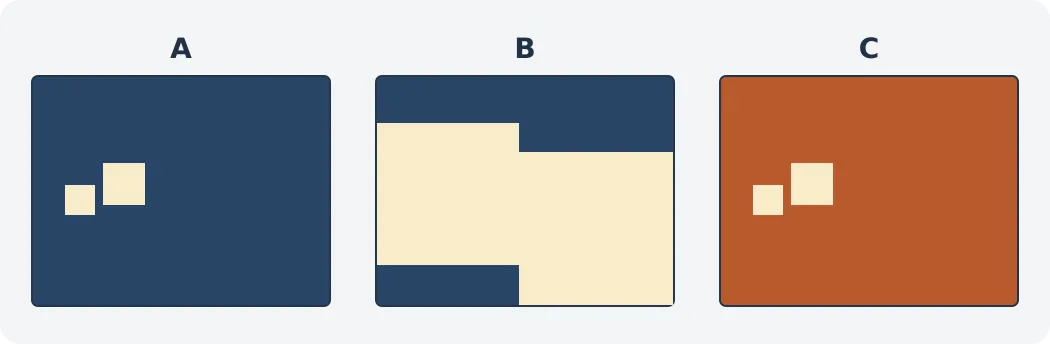
Figure: A and B share a blue background; A and C share the same square layout. Only A passes both checks.
If the deliverable is about camera movement rather than composition, consider the clip separately and check whether it contains the necessary information before and after the move. A suitably wide still does not prove the movement works. Record what each reference supports and what it cannot establish, rather than handing over a pile of links.
When to use your own references
If you only need to choose a kind of blue, two or three self-made swatches suffice. If the image will go into a client deliverable, packaging or a public article, create it yourself or confirm the specific license first. Search, saving or finding the source does not grant copying rights. This guide uses no film frames from the database.
Content note:This article is based on publicly available information and is intended as a reference for evaluating tools. Features, pricing, and related policies may change at any time; please refer to the latest official information.
Original source:help.flim.ai