Flux 3 Studio (flux3.studio) buying guide: does the title still have room in the middle of the animation?
Compare two original storyboards for title clearance from still to motion. Decide whether you need quick motion exploration or precise layout control.
The creative guidance for Flux 3 Studio (flux3.studio) brings still concepts, targeted revisions and motion drafts into one workspace, and asks creators to name what should stay unchanged when revising a composition. The editor's question is not how good the first frame looks but whether approved layout survives the motion. This guide refers to this site only, not similarly named sites or model vendors.
Both drafts start alike, but their middles differ
The animated cover of a fictional industry report needs a fixed title on the left and a group of colored decorative shapes on the right. The left is clear in the still. Imagine two storyboards: A keeps the shapes on the right; in B they intrude into the title zone midway before retreating at the end. The title is legible at both ends in either draft, but only A keeps the middle clear. B may look appealing and still be unfit for handoff to layout.
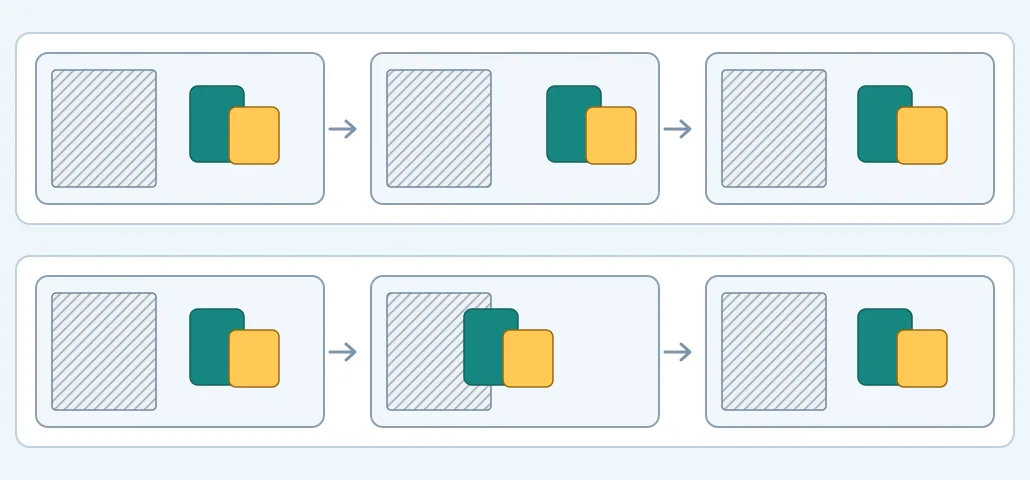
The hatching marks the reserved title area. This is an original layout diagram, not a screenshot or generated result.
Check the start, middle, end and the point of greatest movement; sampling is not a frame-by-frame guarantee. If anything covers the title, return the draft or redefine the title area or motion path in the edit. Do not use the first frame as proof for the whole clip. Compare the still-to-motion workspace if your main task is exploring a motion direction. If you must deliver precisely controlled movement and a fixed safe area, a layout or motion editor with timeline control is easier to verify.
Content note:This article is based on publicly available information and is intended as a reference for evaluating tools. Features, pricing, and related policies may change at any time; please refer to the latest official information.
Original source:flux3.studio