ForgeGUI buying guide: Do matching inventory buttons still show which one cannot be used?
Use three game inventory button states to decide when generated artwork is enough and when you need actual components with testable states.
ForgeGUI (forgegui.com) describes in its GUI kit guide making visually consistent game assets. Its early developer announcement also lists inventories and in-game interfaces among the assets it can generate. Use it to compare the look of an entire set, not as evidence that selected and unavailable states already work in a deliverable component. Do not attribute features from similarly named sites or other plugins to it.
Distinguish unavailable from selected first
Imagine a fictional picnic-packing game. The inventory has three equal-sized item slots: a default slot, the selected slot being viewed, and a slot that is not yet available. If the static artwork uses the same pale border for selected and unavailable, both may look like the same state at small sizes or in grayscale. A better direction gives selected an outline and unavailable a diagonal mark while leaving default unmarked. Tone and texture can stay consistent; color alone should not carry the distinction. This illustration only checks visual cues. It is not a ForgeGUI screenshot, generated output, or an accessibility test.
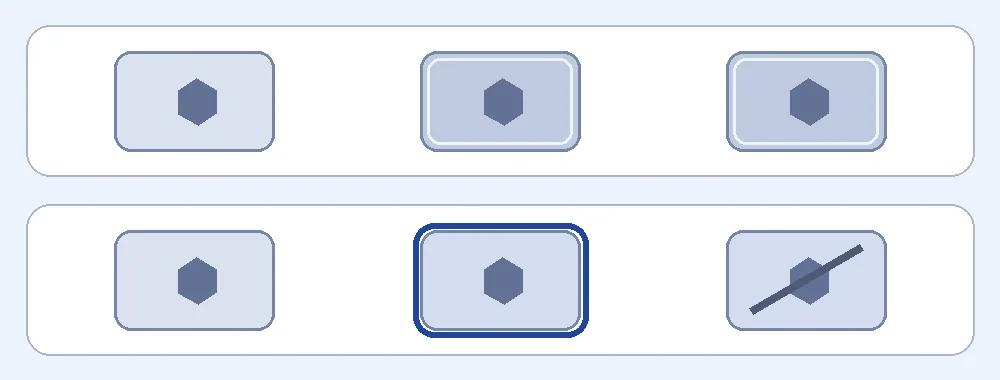
Both rows were drawn for this article. In a real game, interactions, readability and the rules for unavailable slots still need checking in the target interface.
If the goal is to agree on an art direction, comparing a complete set makes sense. Put default, selected and unavailable side by side at their target display size and ask someone unfamiliar with the design to identify them. If they need an explanation to tell them apart, send the artwork back rather than using it directly as buttons. If delivery already requires state logic, clear layout constraints and the ability to make changes by state, start with existing UI components or a design system and use the artwork as reference.
Content note:This article is based on publicly available information and is intended as a reference for evaluating tools. Features, pricing, and related policies may change at any time; please refer to the latest official information.
Original source:forgegui.com