fylm.ai selection guide: Who handles the final color transform when two rooms get the same LUT?
Map input, look, and output in the color-grading handoff before deciding whether the color transform belongs in the receiving project or the delivery file.
fylm.ai’s official LUT export guide explains that exports use the current grade, that including the ACES input and output transforms in the LUT are separate choices, and that the receiving system’s color management matters. That is relevant when a team needs to agree on how to carry a graded look between applications. A LUT is a lookup table that maps colors. Receiving the file does not tell the other team at which stage to apply it.
Two handoff sheets: first count the output transforms
Imagine passing a hand-drawn grayscale test strip from one intermediate color space to two review rooms. The inputs match by assumption, so only output transforms are in scope. In A, the receiving project already has the specified output transform, but the LUT includes the same transform. The handoff sheet says it would be applied twice, so reject A. In B, neither the review path nor the LUT applies the output transform. It has no owner, so reject B as well. Decide whether the delivery file or the receiving project owns the output transform, then record both states on the handoff sheet. Recheck the agreement if the route or target display changes. This checks who does what; it does not predict how the actual colors would shift.
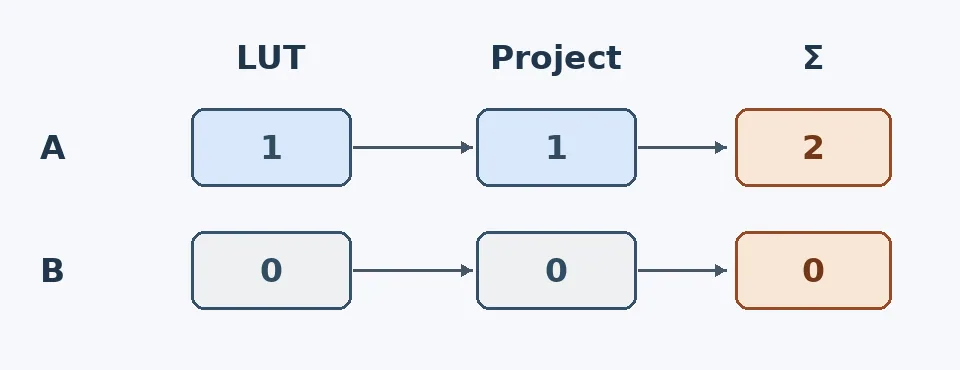
Figure: A and B miss different decisions. A has no sole owner; B has no owner at all. The numbers count output transforms only: 1 means applied once and 0 means not applied. “Project” is the receiving project, and Σ is the total. This is an original paper exercise, not a color test.
When the same look has to cross two known color pipelines, compare the export choices in fylm.ai and count receiving-app color management, target format, and staff review time as costs. If everyone works in one verified grading project throughout, staying there can avoid an unnecessary handoff. If no one can explain the receiving setup, ask whoever owns it rather than treating a LUT as a universal preset. This paper comparison involves no uploading, downloading, or image processing.
Content note:This article is based on publicly available information and is intended as a reference for evaluating tools. Features, pricing, and related policies may change at any time; please refer to the latest official information.
Original source:fylm.ai