Choosing Gemini Omni 1.1 Flash: Does a loop work just because its endpoint images match?
Endpoint frames guide the shot. Review movement direction and step size on both sides of the join separately.
This is Google’s Gemini Omni 1.1 Flash, not a third-party namesake. Google’s August 2026 announcement described guiding a continuous shot with first and last frames. It separately announced 1.2 on November 5. This guide concerns the described 1.1 endpoint feature, not current availability or newer features.
Examine both sides of the join, not two screenshots
Imagine a background animation with a dot going clockwise on a ring, joining at 12 o’clock. In A both endpoints show 12, but the dot moves backward to 11 after the join. In B the nearby samples are 11, 12 and 1 with roughly equal spacing. Reject A. Even with B’s correct direction, a first move of three ticks instead of one could reveal the join. The ticks are a fictional standard, not a measurement or output.
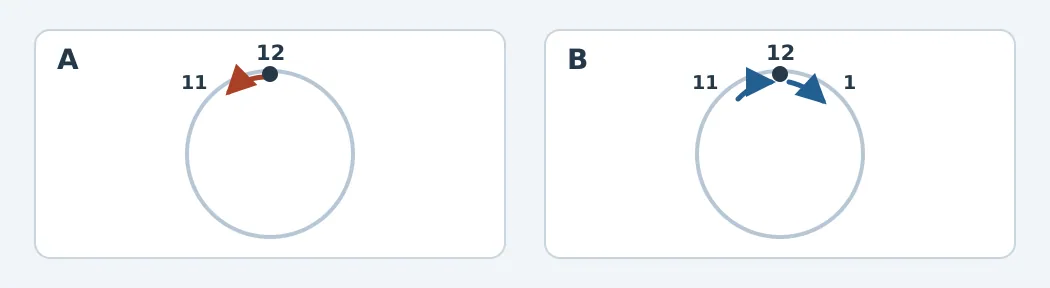
Figure: The black dot marks the shared join. Arrows show movement near it.
Check endpoint position, direction, step size and any abrupt background color change separately. If the footage across the seam is missing, mark motion unverified rather than inferring it from matching pictures.
When endpoint guides are useful
Consider them with two self-drawn concept frames and room for finishing. For a simple interface loop that must repeat precisely, deterministic vector animation is easier to audit. If delivery requires an editable animation, check the file format separately; a draft video is not a traceable animation project. No video or reference to a real person is used here.
Content note:This article is based on publicly available information and is intended as a reference for evaluating tools. Features, pricing, and related policies may change at any time; please refer to the latest official information.
Original source:blog.google