getTxt.AI buying guide: The text was extracted. Did the two columns get mixed together?
Check reading order after a Markdown conversion with an original two-column newsletter. Decide when conversion saves editing and when manually rearranging columns is better.
getTxt.AI treats in its conversion comparison multicolumn PDFs as a separate case. Its format guide also discusses reading order and structure. This article compares PDF-to-Markdown conversion, not transcription, video or automation endpoints. Finding text with a search and handing it to the next editor are different standards: an editor still needs to know where every sentence belongs.
A tip from the right column does not belong inside the left paragraph
Imagine a fictional aquarium newsletter. Under “Tide Table” in the left column, the first line gives the table’s reference time and the second the dates it does not cover. “Glossary” in the right column defines “tidal range.” If flowing text jumps from the first left line to the right heading and back to the second left line, all the words may survive but the paragraph means something different. An acceptable version keeps the two lines under “Tide Table” and starts “Glossary” separately. This is a layout illustration, not real navigation data or a third-party document.
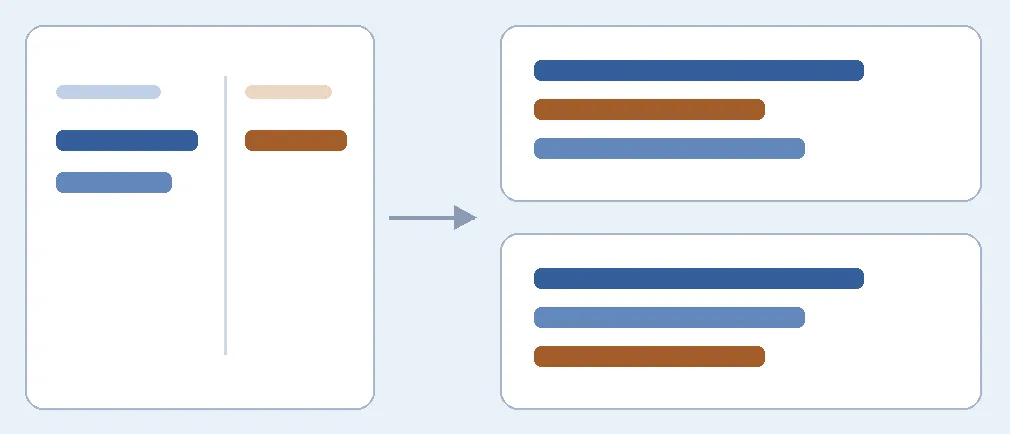
Color marks which column owns the text. Top and bottom right contain the same three items, but only the bottom preserves paragraph grouping. This is not a conversion test.
Make a two-column sample of your own and list its main column, sidebar and expected order. Check which sentences sit below each heading in the result. If the deliverable is only rough topic search, compare extraction speed and then check for mix-ups. If you will edit the text again, verify paragraphs and headings independently. Export straight from an editable original if available. For a few pages with frequent spanning columns or merged boxes, manual extraction by column may avoid rework. No files were uploaded or converted, and no interfaces were enabled.
Content note:This article is based on publicly available information and is intended as a reference for evaluating tools. Features, pricing, and related policies may change at any time; please refer to the latest official information.
Original source:gettxt.ai