Glisio buying guide: A smooth pointer doesn't tell you which option was clicked
A demo handoff must show the target and its neighbor. Checking the pointer animation alone is not enough.
The official changelog for Glisio says v0.4.2 in July 2026 used the same cursor-path smoothing in export as in the editor preview. This gives people explaining screen actions something concrete to compare in the preview and deliverable. Smooth motion does not show whether the target remains visible or whether viewers understood the action.
Ask a newcomer to identify the target and its neighbor
A fictional puzzle catalog has adjacent options “Show outlines” and “Show numbers.” Viewers should be able to tell that outlines, not numbers, were turned on. In paper frame A the pointer takes a smooth path to the first option, but both labels are missing from the delivered view. In B the pointer ends at the first option too and both labels remain in the final held frame. Both arrows point to the first option. Ask a colleague which of the two named options was selected: only B leaves enough evidence. No screen capture, measurement or video generation took place.
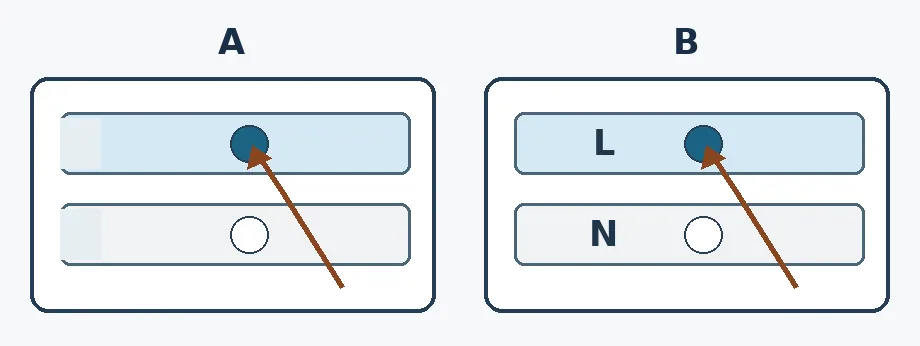
Figure: L means “Show outlines” and N “Show numbers.” The arrow marks the pointer endpoint only. In A there are no readable labels to tell what was selected. This is an original legibility diagram, not a screen recording, software interface or smoothing test.
Consider this editor when reviewing both the cursor path and final legibility in your own demos. Budget time to review the final file and ask a viewer to explain the action. A self-drawn static diagram with labels is simpler for explaining two buttons. Do not substitute animation for key labels or expose unrelated windows or private information. No permissions enabled, software installed, screen recorded, file exported or real interface accessed.
Content note:This article is based on publicly available information and is intended as a reference for evaluating tools. Features, pricing, and related policies may change at any time; please refer to the latest official information.
Original source:glisio.com