Gridset buying guide: after applying the brand style, can readers still spot what needs a decision?
Gridset can format existing material into a consistent briefing. Test whether the cover separates open decisions from confirmed plans using the same fictional operations notes.
The briefing guide from Gridset shows how to turn notes and brand material into a briefing and includes decisions readers need to make. The appeal is less repetitive formatting. A clean design can actually make action harder if it presents pending and confirmed items the same way.
Show readers what they cannot act on yet
A fictional reading room wants to try two places for its book cart. The notes contain three items: a Tuesday trial is confirmed; the wall or window position will be chosen after the trial; the space by the wall was measured at 80 cm. Option A makes all three prominent blue cards, so readers might think the wall position was selected. Option B puts “Decision pending: parking position” first, lists Tuesday among confirmed items and keeps the measurement as comparison evidence. Colors can vary; those statuses must not be conflated.
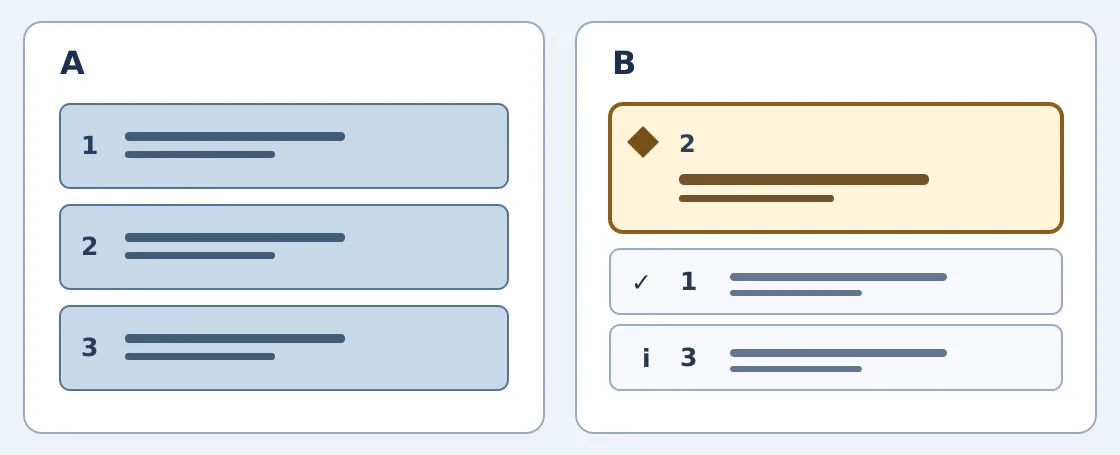
The left makes the three items equally prominent. On the right, item 2 is pending and placed first, a check marks confirmed item 1, and an information symbol marks evidence item 3. This is an original layout illustration, not a screenshot.
Ask someone who has not seen the notes what to do Tuesday, when the position can be confirmed, and whether 80 cm is a measured value or a threshold for rollout. The layout and words must let them answer all three unaided. If a thumbnail or narrow screen separates the pending label from its options, fix and recheck it instead of relying on the desktop preview. This is an original example, not a Gridset test or customer material.
When an existing template is enough
If the layout is already clear or the team makes only a few briefings each year, add confirmed, pending and evidence to the existing template. Compare Gridset for time savings if every issue needs a fresh layout from different sources. Check the vendor privacy policy for permissible material and upstream services, and start with a nonsensitive sample. There is no need to use restricted notes or original brand files to try a layout.
Content note:This article is based on publicly available information and is intended as a reference for evaluating tools. Features, pricing, and related policies may change at any time; please refer to the latest official information.
Original source:www.gridset.app