Gutta buying guide: Why doesn’t a dated task always trigger a reminder?
A menu-bar task can have a date, a time, or a notification. Run three paper checks on the lead time before choosing Gutta for a personal list.
If you spend the day at your Mac and want to jot down a task from the keyboard, Gutta’s menu bar and quick entry are a good fit. If you cannot afford to miss a deadline while away from the computer, don’t assume that an item in Today already has an alarm. Entry and notification are two separate checks.
Work out the date, time, and alarm separately
The official documentation distinguishes date-only tasks from timed tasks. A global bell sets the default lead time, while each timed task can override it or turn its reminder off. The v0.0.6 parser maps the English word morning to 09:00 and gives an explicit clock time priority when both are present. The checks below deliberately use English phrases; they do not imply support for parsing any language.
On paper, assume the Mac’s local time is 14:00, you have set the global reminder lead to 15 minutes, and all tasks are incomplete with no overrides. A: Review sample tomorrow has a date only and gets no local reminder. B: Review sample tomorrow morning is due tomorrow at 09:00, yielding a candidate reminder at 08:45 tomorrow. C: Review sample today at 14:10 is not overdue, but its reminder time was 13:55 today. The reminder code only schedules a trigger that is still in the future and requires macOS to allow notifications. C does not produce a catch-up notification just because it is almost due.
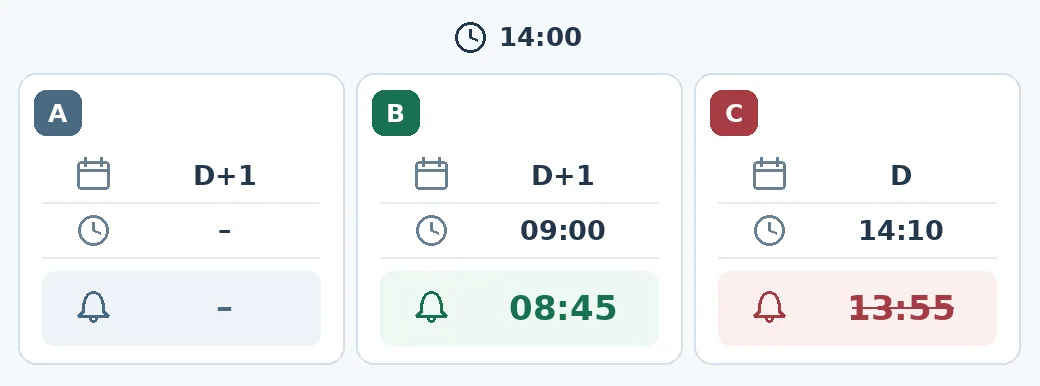
Paper calculation, not a Gutta screenshot or a notification test. B clears the timing check; that does not prove delivery. In the diagram, D means today and D+1 means tomorrow.
When to keep your existing reminder tool
In a team-approved environment, compare the displayed dates and times with the three examples, then use a harmless test item to see whether a notification actually appears. Check for a task override, subtract the effective lead time, and make sure macOS permits notifications and shows the alert as expected. Do not use a customer commitment or hard deadline as your first test. Keep your existing reminder channel if delivery is critical on another device or after a handoff. The documentation describes local notifications; syncing task records through your own folder is not a promise of cross-device delivery. The release page identifies the prebuilt 0.0.6 release as Apple silicon, and the documentation specifies macOS 14 or newer. If the device or workplace software requirements do not match, keep your existing setup.
Content note:This article is based on publicly available information and is intended as a reference for evaluating tools. Features, pricing, and related policies may change at any time; please refer to the latest official information.
Original source:github.com