Halo AI buying guide: Can a photo with a new background still be your product listing image?
Halo AI is useful for trying backgrounds on an existing phone photo, but a good concept image is not necessarily a faithful product photo. Use a homemade sample to check the product details before deciding whether to keep a generated version or finish the listing image with layer-based editing.
If you have a sample photo and only want to see whether a black or light grey tabletop shows off the product better, Halo AI is worth trying for composition. Start with the original on your phone and describe the background in a sentence to get versions to compare. The final listing image has a higher bar: the ports, model identifier and accessories shown must match the physical item. If any of those details are wrong, a prettier image is not a good reason to show it to buyers.
Halo AI’s editing guide describes how to use an existing photo to generate edited versions on iPhone and Android. It suggests telling the tool what to change and what to keep, and distinguishes this method from layer-based editing with manual pixel control. “Keep the product unchanged” is an instruction to the model, not a lock on the foreground pixels. For choosing a direction, it saves you from setting up a mask first. But if you have to check every nameplate and possibly reshoot, count that rework against the time saved.
Start with a photo of a homemade cardboard box. Write a fictional model identifier on the front, attach two pieces of tape of different lengths to the side, and place one cable beside it. Use the same original to make a dark version and a light version, asking to change only the background. Judge the exported files, not just the phone preview. Look at the outline at listing thumbnail size, then zoom in and compare with the original: check the letters of the model identifier, the positions of the tape, the cable count and the object edges. Record each result in two columns: “usable for choosing a background” and “eligible for final review.” If either version changes a detail, do not take the passing result on the other as proof of reliability across a batch. If every SKU image must preserve a clearly defined foreground, use a manual mask or layer-based edits. If even a mask cannot keep the transparent edges intact, change the backdrop and reshoot.
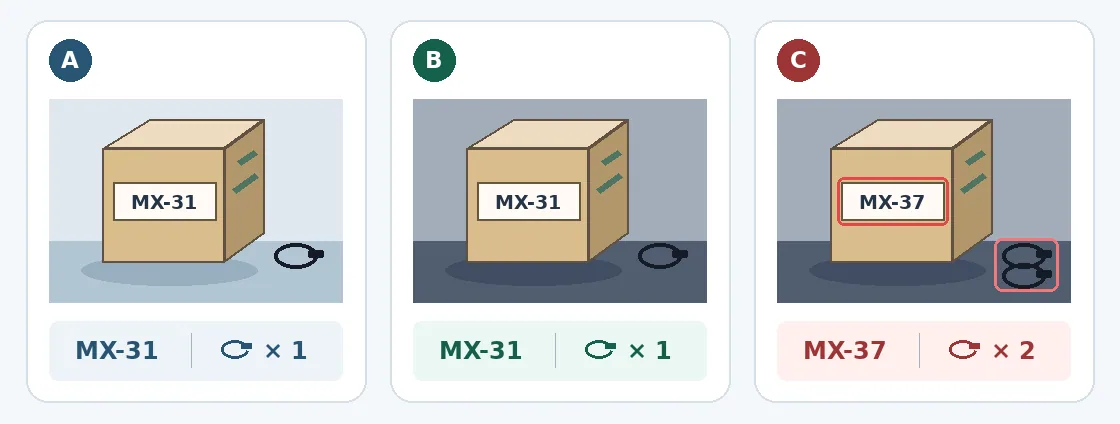
Original illustration of the acceptance check, not Halo output or a test result. A is the baseline. B darkens the background but keeps MX-31 and one cable. C deliberately changes the model identifier to MX-37 and shows two cables, so it cannot go straight onto a listing.
A homemade sample also keeps unreleased materials out of an unapproved service. Halo AI’s privacy policy says source images, prompts and outputs may be stored and, where users have not opted out, used for training. It also lists an external model hosting provider used for generation. Opting out of training is not the same as preventing external transfer. For ongoing costs, use the local price, allowance and renewal period shown at purchase, then account for time spent regenerating and reviewing images. The terms of service describe subscriptions and metered usage tiers, and say subscriptions renew automatically unless canceled in time. If the tool fails your asset-sharing rules or the image fails your acceptance checks, keep Halo for composition with homemade samples rather than putting it in your production listing workflow.
Content note:This article is based on publicly available information and is intended as a reference for evaluating tools. Features, pricing, and related policies may change at any time; please refer to the latest official information.
Original source:halo.camera