Choosing Landing’s AI Landing Page Generator: Check campaign capacity before generation speed
Small teams that regularly build branded campaign pages can evaluate Landing.so’s generation, visual editing, and hosting workflow. Adoption makes sense only if content review, form handoff, and budget all work. Enough page slots do not mean sufficient visitor, lead, or AI-credit allowances.
Marketing teams may need fresh campaign pages every month while developers are tied up copying layouts, replacing images, and revising registration instructions. Landing.so’s AI Landing Page Generator can reduce that part of the handoff: the official tool page describes generating copy and designs from a topic or keyword, making changes in a visual editor, sharing links for review, and using built-in hosting and a custom domain. Its useful role is to reduce repetitive build work, not replace the campaign owner’s editorial judgment or a proven form delivery workflow. If the existing site already has suitable templates and reliable registration, one or two occasional events may not justify maintaining another hosting platform.
Start with a campaign the next person can take over
Evaluate the tool using a fictional product briefing. Do not run ads, import a customer list, or publish to a real audience. Give it the finalized time, intended audience, what registrants will receive, and the contact person before asking for a first draft based on those details. The official site says you can add your own images, testimonials, and FAQs. Being able to add them does not mean AI can supply genuine testimonials for the team. Remove any unsupported awards, performance figures, quotes, or service promises. Pulling colors and fonts from the existing site does not guarantee correct pricing, timing, or service scope for this campaign.
Test the value of visual editing and review links with an actual revision task: after the owner changes the date, shortens the registration instructions, and removes an unapproved testimonial, do desktop and mobile still show the same version? Use your own authorized assets to check long headlines, narrow-screen buttons, error messages, and the confirmation shown after submitting. Then ask for a demonstration with fictional records showing where the form data goes, so the person taking over can find the record, identify its campaign, and follow up as promised. A success message does not prove the record reached the right team. Nor should any of these acceptance criteria be presented as a capability the product guarantees.
Eighteen pages can fit even when the leads do not
The official pricing page lists 20 landing pages, 50,000 visitors per month, 1,000 leads per month, and 600 AI Agent credits for Pro. Treat these as separate budget lines rather than assuming a tool that generates many pages gives you unlimited usage. Suppose six campaigns each keep three page versions, giving 18 pages, with 30,000 visitors and 1,200 leads in the same month. The page and visitor figures fit within the stated Pro limits, but leads exceed the allowance by 200. This is a capacity calculation, not a conversion forecast or measured performance.
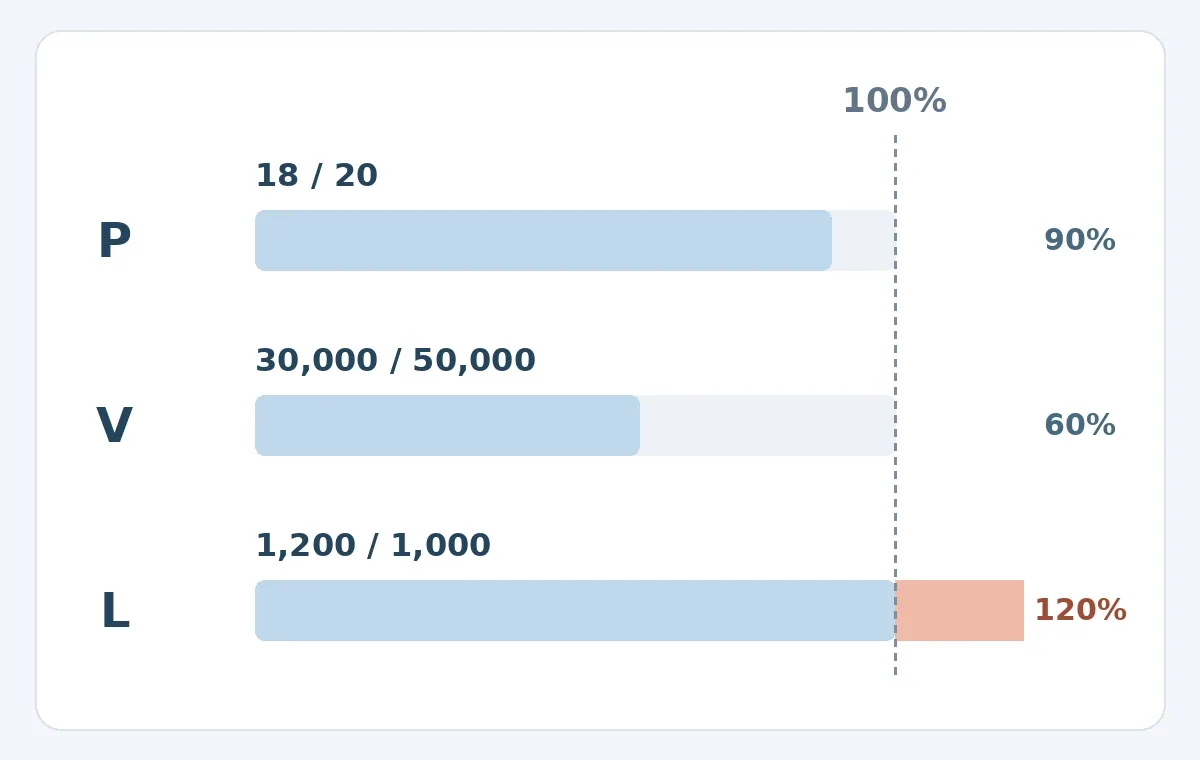
Original capacity calculation, not a product interface or measured result. P is the page count, V is monthly visitors, and L is monthly leads. Each row is relative to its own allowance; the dashed line marks 100% of that allowance. Pages and visitors are within their limits, but that does not make the lead allowance sufficient. The chart does not estimate AI credits.
The official overage FAQ says Landing emails customers when visitor or lead limits are exceeded. Pages continue to work normally, and customers can upgrade or wait for the next billing cycle. That explains why the pages do not stop immediately because of these two overages, but treating overages as unlimited capacity is not a sound basis for purchase. Decide who monitors the emails, when to make an upgrade decision, and whether peak-season campaigns could be delayed. Also verify in a demo how many of the 600 credits one generation or revision actually uses before estimating the budget. Page limits are not a substitute for budgeting AI usage.
With the annual discount on by default, the pricing page displays US$79 per month for Pro alongside a comparison figure of US$99 per month. That does not mean one month of campaigning will cost only US$79. Before buying, check the selected billing term, total due, and taxes. The 14-day free trial is stated to include Pro features and require no credit card, so you can complete the handoff checks before committing. In a comparison with your existing site templates, count editorial review and registration handling on both sides. Landing adds the subscription, domain setup, migration, and ongoing monitoring, while potentially saving time building and repeatedly revising pages.
Hosting is convenient, but check the exit
The official site puts hosting and publication in one workflow, which suits small teams that don’t want to coordinate a separate deployment. Before adopting it, settle who owns the domain, who takes over if the owner leaves, how pages come down after an event, and how registration records are archived. The pricing FAQ says pages and data remain accessible for 30 days after cancellation, during which you can export data or reactivate the account. This is not permanent storage and does not imply that a complete, portable copy of the website source code is available. Ask to see the format and scope of the records you need, decide where to store them, and keep a separate copy before moving.
Landing is worth shortlisting if the team frequently runs campaigns under one brand, can review content and demonstrate a fictional form handoff during the trial, and accepts the separate capacity limits and ongoing hosting costs. If the key needs are complex business forms, strict data residency, or fully independent deployment, keep the proven toolchain unless those requirements can be substantiated. A page sample that someone else can take over, a capacity budget, and a documented exit plan are more useful than a pretty screenshot showing that something was generated in minutes.
Content note:This article is based on publicly available information and is intended as a reference for evaluating tools. Features, pricing, and related policies may change at any time; please refer to the latest official information.
Original source:www.landing.so