PicVerb: Is AI worth using to change one number on a poster?
When the source is missing, check the fields that must stay fixed before deciding whether to rebuild.
If you have an editable file, change the text there. Consider PicVerb when all you have is a flattened image you own, the background has texture and just one item needs changing. Its text replacement page asks you to upload an image and specify the edit; the official sitemap dates the page to August 16, 2026. It can generate a candidate, but that does not guarantee the other text and layout stay fixed or that an editable layer is restored.
Verify what should not change
On a fictional internal sign, change zone A-12 to A-13. Keep 14:30, the green marker and the pale paper texture. At display size, check that the new number reads at a glance. Then zoom in beside the original, read 14:30 character by character and compare the marker’s position and text baseline. The version on the right has the correct zone but the wrong time. Reject it outright: the wrong time is not a visual blemish.
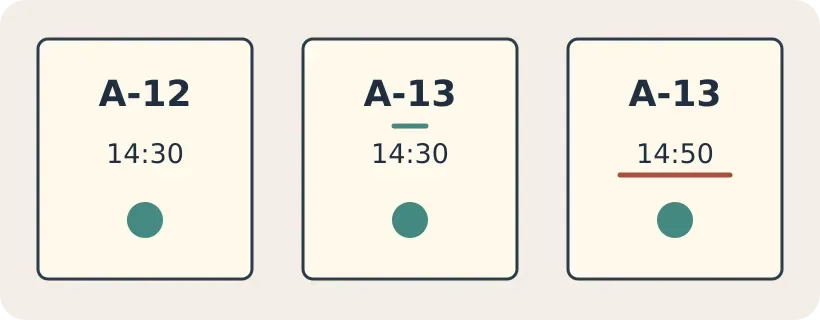
Original inspection example, not product output. The middle changes only the intended number; the right also changes the time.
When to rebuild
If the design is simple and you have the font and background color, it is easier to rebuild and inspect that area in a layout tool. For a repeat-use template or an image with several times and codes that must be exact, rebuild the editable type layer rather than regenerating the image each time. A generated patch is worth using when one detail changes, everything else passes inspection and you don't need more versions.
Content note:This article is based on publicly available information and is intended as a reference for evaluating tools. Features, pricing, and related policies may change at any time; please refer to the latest official information.
Original source:ai-image-changer.com