Is Xiaoyunque AI worth using for ad mockups? Test a one-shot revision first
Compare Xiaoyunque AI with a phone rough cut on a three-shot sample. The deciding factor is whether a change to the middle shot keeps approved product details and neighboring shots usable.
Xiaoyunque AI is worth a look for content teams that need to see how three shots fit together before filming, especially when reviewers usually change one detail after seeing a mockup. It may be the wrong choice for final ads that must reproduce fine print, measurement marks or material properties faithfully. Film the real product for those shots and use AI to plan them if helpful.
A creator case carried on Xiaoyunque’s site shows written material broken into scenes and storyboards, and a selected video segment reshot. That demonstrates a workflow, not a guarantee that every unselected frame will survive. Test whether one small revision can be made without remaking the others.
Use an original, unbranded cup for three shots
Draw or photograph your own teal handled cup. Use no unreleased client assets, other ads, faces or voices. Show the cup on a desk, water being poured and the lid going on before the cup is taken away. Approve the first and last shots, then ask for the middle shot to change from medium to close. Keep the handle, stripe, stated capacity and last shot fixed. Check frames around the cuts for changes in handle or water level and compare the lid against the previous shots. The original drawing is a suggested test, not Xiaoyunque output or a screenshot.
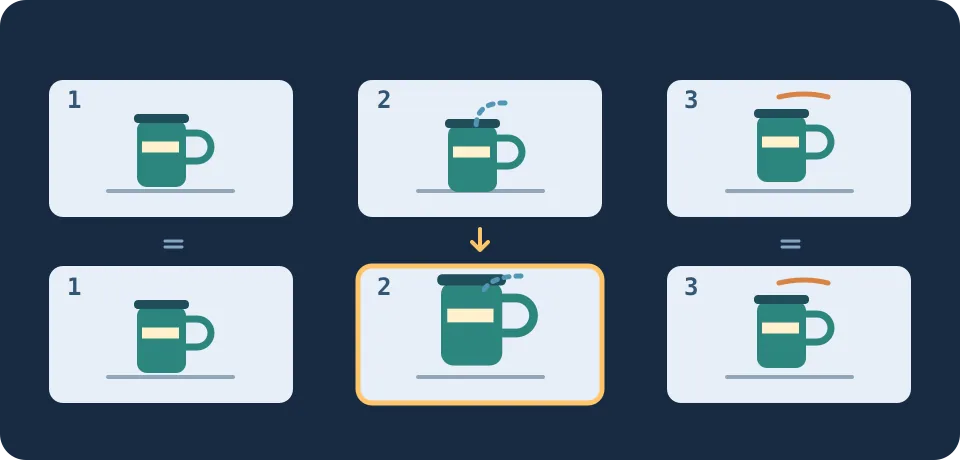
Figure 1. Ask for a tighter framing on shot two only. The update still needs a check on both sides of the cut and on the cup itself.
Count both camera pickups and regenerations
Run the same cup, shot list and requested revision with Xiaoyunque and with a manual storyboard plus phone rough cut. Time the first draft through a review-ready handoff, including queues, unusable takes, retries, pickups and export. Repeat with another prop you own. Confirm whether your account and model support segment reshoots, how retries use credits, whether the required export format is available and whether your intended use is permitted for inputs and outputs. Do not budget from a launch discount or the first generation time.
Include it in mockup production only if both rounds preserve approved shots and product details and reach review faster. If you usually have to redo the whole sequence or need exact package text and product behavior, a manual shot list and a real-product rough cut are easier to control.
Content note:This article is based on publicly available information and is intended as a reference for evaluating tools. Features, pricing, and related policies may change at any time; please refer to the latest official information.
Original source:xyq.jianying.com