Choosing Alta: why can one inbound lead enter two follow-up sequences?
Evaluate Alta’s inbound conversations and downstream workflows together. Use one fictional lead to check state changes, audience exclusions and delayed events, ensure interest is not recorded as agreement to a meeting, then compare existing manual handoffs with added maintenance costs.
If your team wants Alta to handle prospects who approach you first, the purchasing question is not only whether Alex can sustain a conversation. It is also whether the old follow-up stops when the same lead becomes more interested. Alta brings inbound qualification and subsequent sales workflows into one platform, making it relevant to teams with a real burden of handoffs between stages. If you only need to collect a question and have a person answer it, an existing form plus CRM is often easier to control, without the maintenance cost of a more complex workflow.
Alta’s official inbound playbook distinguishes two follow-up sequences: marketing-qualified leads who have not booked a meeting, and higher-intent leads. The latter can include people who booked but did not attend, or visited a high-intent page. The guide also describes automatically enrolling people who initiate a conversation with Alex in subsequent follow-up, and explicitly calls for audience exclusions so the same lead does not sit in both sequences at once. That deserves more scrutiny from a buyer than a promise to capture every lead automatically: as a lead’s state changes, can the workflow switch with it, rather than continually adding tasks?
Use one fictional ID to inspect the boundary between two sequences
Start by mapping the issue on paper, without connecting real contact lists, email addresses, phone numbers or outbound calling. Suppose fictional lead L17 submits a product question and has not booked a meeting, making it eligible for ordinary inbound follow-up. The demonstration data later marks it as higher-intent, satisfying the second sequence’s conditions. If you only check whether each entry condition matches independently, L17 could enter both. The team must decide beforehand which sequence should remain active and verify that the other is excluded. These states and this ID are original acceptance-test material, not results from testing Alta. Browsing activity is not consent to follow-up through any channel, either.
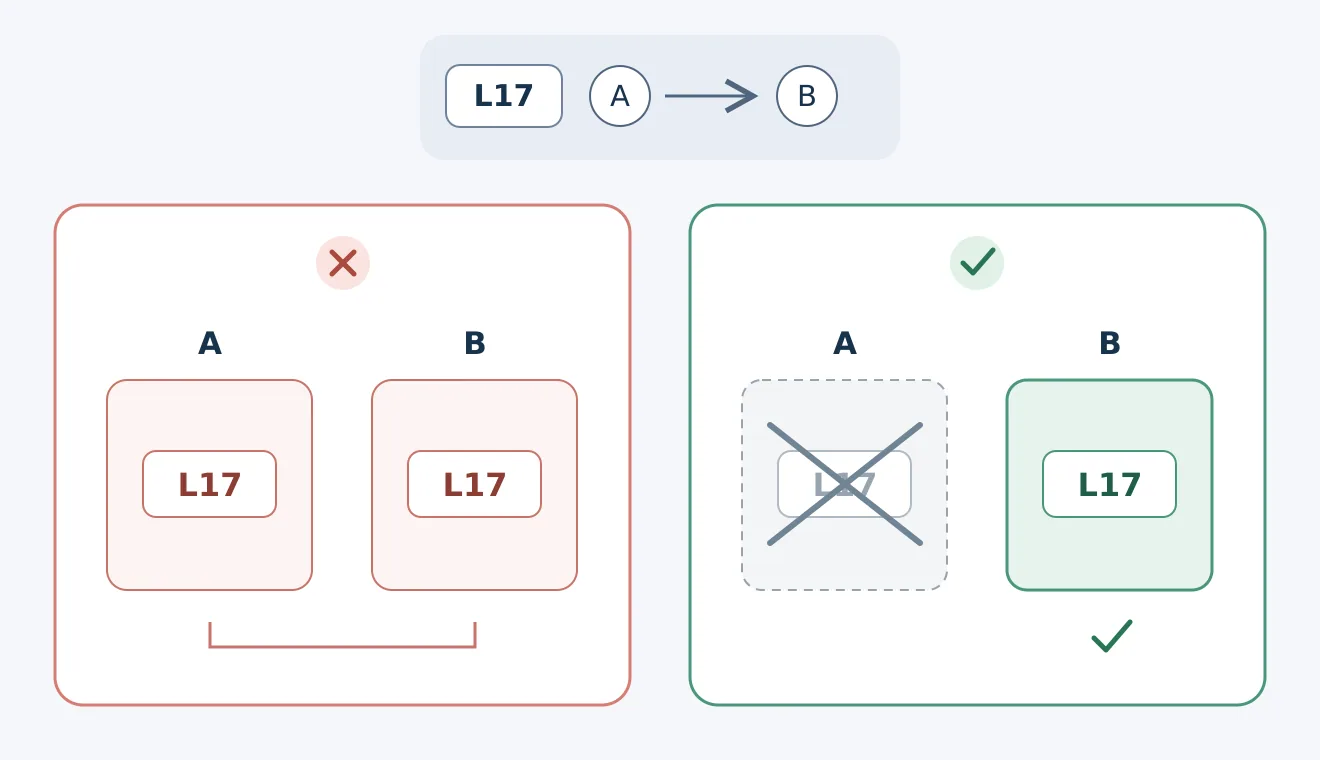
Original acceptance-test illustration, not an Alta interface or execution result. A means ordinary inbound follow-up; B means higher-intent follow-up. Under the example rule, choosing B should exclude A, rather than retaining both. Arrows show state changes to verify, not messages sent or permission to contact anyone.
Ask the vendor or implementer to explain three things in a demonstration environment that produces no external actions: which sequence L17 currently belongs to, why, and what happens to actions in the other sequence that have not yet executed. Then introduce a delayed old event and check whether it enrolls the switched lead back into the previous sequence. The official guide explains the purpose of audience exclusions, but that does not establish that queued actions, duplicate events and state reversions will all be handled correctly with your CRM’s synchronization order. Treat anything unconfirmed as a delivery requirement, not as a problem solved by adding “do not duplicate” to a prompt.
A smooth conversation does not mean the next step has consent
Alex’s inbound script guide calls for defining identity, call objectives, conversation stages and closure. It also lists questions about needs, timing, budget and the decision process. An initial acceptance check can use only a fictional inbound inquiry: “I just want to understand where this fits; I’m not booking a demo for now.” The desired outcome is to answer questions supported by the available material, leave undetermined fields unresolved and end according to the inquirer’s wishes, rather than recording “interested in learning more” as “agreed to a meeting.” This is a reception standard the team should set, not a verified default behavior.
That standard must extend beyond the conversation. The official workflow connects the Alex entry point to subsequent follow-up, so one polite response is not enough to qualify the whole solution. Check whether it creates tasks, enrolls the person in other workflows or schedules contact, and how it respects requests for no further contact or communication limited to the current exchange. Keep all external sending, dialing and calendar writes disabled during initial checks, comparing only fictional states with expected handling. The official configuration document provides a browser-based Web Call test, but this does not establish that all connected tools are isolated. If you cannot confirm that testing has no external effects, stay with script and state-table review.
The adoption threshold should be fewer duplicate handoffs, not more follow-up attempts. Have the existing form and manual CRM workflow process the same fictional events, compare missed handoffs, duplicate tasks, incorrect states and human correction time, then check Alta’s quote for the required workflows, usage, connections, rollout configuration and ongoing maintenance. Do not treat the guide’s broad conversion claims as your team’s expected return. Expansion makes sense only when intent and state changes reach the downstream workflows, someone owns the exceptions, and duplication and reversions can be explained. Otherwise, clarify the existing handoff rules before considering automation.
Content note:This article is based on publicly available information and is intended as a reference for evaluating tools. Features, pricing, and related policies may change at any time; please refer to the latest official information.
Original source:support.altahq.com