BoltAI guide: How do you rewrite one color phrase without changing the measurements next to it?
Use two fictional model labels to check that only the color wording changes and both names, numbers, and units remain intact.
A small selection doesn’t mean a small review
This is BoltAI for Mac, not Bolt.new. In the September 2024 v1.21.0 release notes, the developer said AI Command could read highlighted text in the active app and described obtaining it through accessibility or the clipboard. The appeal is not having to treat the whole page as a draft for revision. You still need to consider compatibility and what text the app is allowed to read. Those historical notes don't guarantee the same behavior today or in every app, or that a rewrite will automatically respect the intended scope.
Draw the boundary with two invented lines
Write two model labels on paper: “Curved sign | blue with some gray | 18 cm” and “Square sign | mist white | 24 mm.” Only the first color phrase should become the more natural “gray-blue”; leave object names, numbers, units, and the second line alone. Paper example A circles only the color phrase; B circles both lines in full. A exposes less text to the rewrite and is easier to check. B includes more information that needs no editing and adds review work.
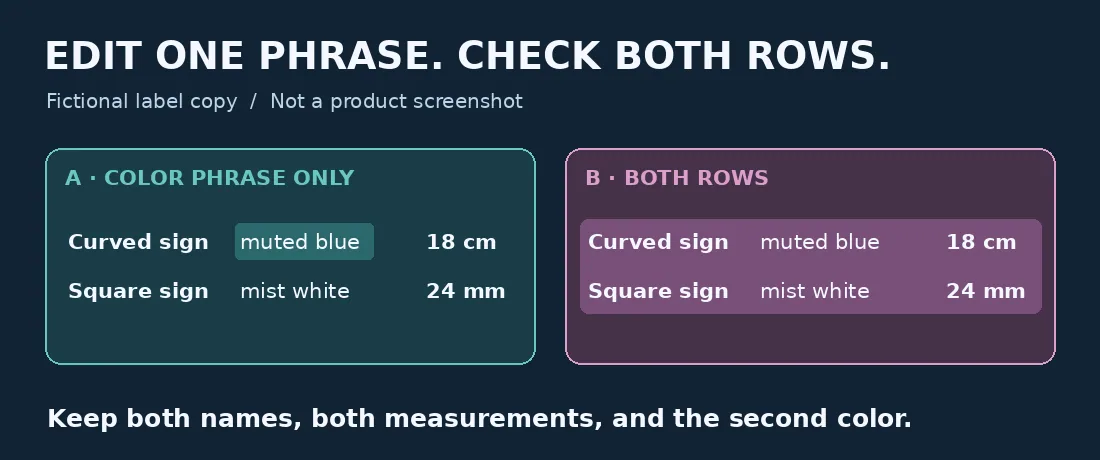
Only the first color phrase should change, but check the whole original. Original paper example, not a product screenshot.
Reread both lines before accepting the edit
A smoother color phrase is only the first check. Compare with the original: the curved sign is still 18 cm, the square sign is still 24 mm, and “mist white” hasn’t changed. Changing 24 mm to 24 cm fails even though it looks like a one-letter edit. So does dropping “curved.” If you can’t name the editable words and the fields that must stay intact, don’t replace the text yet. This is a paper example, not a BoltAI test. No app was installed, permissions changed, or text sent.
When a manual edit is simpler
If you frequently revise short phrases on a Mac and can isolate the intended wording then compare it with the original field by field, BoltAI’s selected-text approach is worth considering. If it’s one sentence, the dimensions are easy to get wrong, or your app does not permit this kind of text reading, edit the color phrase by hand. For exact specifications, you can also maintain copy and specifications separately instead of sending both for rewriting.
Content note:This article is based on publicly available information and is intended as a reference for evaluating tools. Features, pricing, and related policies may change at any time; please refer to the latest official information.
Original source:feedback.boltai.com