Choosing Guidde: When should help update live and training stay on one version?
Use a live Guidde embed for public help, the original guide’s access controls for restricted viewing, and a controlled static export to retain an approved version. A fictional revision can test all three.
A help center needs to show customers where the new button is. The training lead needs to know what the last group actually saw. Guidde can produce video and step-by-step documents from the same kind of recording, but those two jobs should not share a single distribution route. Decide who can view the guide first, then whether it should follow updates.
Live embeds suit public help, not restricted materials
Guidde’s web embedding guide says external websites require the guide to be Public. You can embed the video, the steps, or both. Its embed versus export guide explains that embeds follow updates to the original. A single revision can update public help without replacing each embed, provided the host supports embedding and the recording, text, and narration are all safe to make public. Putting the player behind a login does not change the original guide’s public visibility.
If internal material must also stay current, link to the restricted original instead of making it public to embed it. The sharing guide distinguishes link holders, workspace members, and named people. It lists advanced sharing and privacy controls under Business and Enterprise. Before buying, have an admin verify the actual plan and whether the intended viewers can get in. Workspace-wide viewing is still too broad if only named people should have access. If your signed-in portal must play the guide inline without making the original public, do not rely on ordinary external embedding; consider your portal’s existing controlled video hosting.
Archive the file, not just the link
Guidde’s export guide says downloads require Pro, Business, or Enterprise. The documentation also rules out exporting during the free Business trial, so do not rely on that trial to verify the archival workflow. MP4 loses the player’s interactive elements, and a PDF can still link back to the online video. To retain training as approved, store the MP4 and any needed step files in a controlled library, and record the version, approver, and effective date. Check that the files are complete without opening external links. Old files do not follow later edits. Once downloaded elsewhere, access and retirement of old copies are the receiving system’s responsibility, not the original Guidde’s access controls.
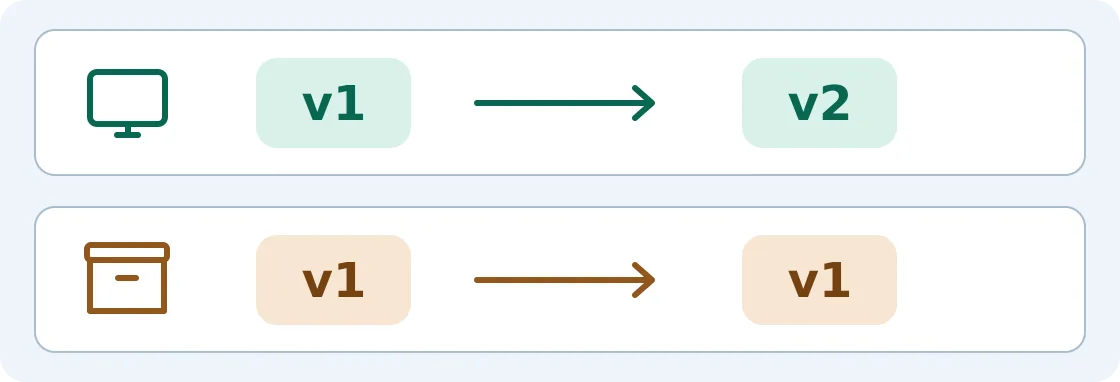
Original diagram: live embed above, archived file below. v1 and v2 are example labels, not built-in approval states.
Walk both routes through one revision
Use a demo recording with no real data: the button says “Submit” in v1 and “Send for review” in v2. In an authorized test environment, confirm the public help moves to v2 and the approved export still presents v1 on its own. Separately, check that an authorized account can open a restricted link and an unauthorized account cannot. Check the recording, text, and narration, not just the title. If preserving the approved version matters most but no one owns checks, re-exports, or retiring distributed copies, keep training in your existing controlled library. Use Guidde for public help that can change with the product.
Content note:This article is based on publicly available information and is intended as a reference for evaluating tools. Features, pricing, and related policies may change at any time; please refer to the latest official information.
Original source:help.guidde.com